Given the popularity of our web meeting "building a Fault Tree from a schematic" we have come up with another real world example. This time we will be applying Monte Carlo Simulation to an RBD using our AvSim Software.
Blog
Threat/Attack Analysis
Attack trees allow threats against system security to be modelled concisely in a graphical format. The effectiveness of internet security, network security, banking system security, installation and personnel security may all be modelled using attack trees.
In the following webinar we decided to model a threat example in our AttackTree+ software. We took an article from www.wired.com where hackers remotely killed a Jeep Cherokee while driving 70 miles per hour on the freeway. Using this article we created an example in our AttackTree+ software.
Note: much of the failure rate data was made up using information available on the internet.
Reliability Workbench Version 13… What’s New
As a follow up to our Webinar: What's New in Reliability Workbench 13 Webinar I have included a recording of the meeting.
In addition to some minor visual upgrades the significant new features in Reliability Workbench 13.0 are:
- The FIDES Prediction standard has been added to the Prediction Module.
- 217Plus has been upgraded to version 2015.
- The NPRD library has been upgraded to NPRD-2016.
- The FMD 2016 failure modes library has been added to the NPRD parts library. FMECA blocks created from the NPRD library will now also have their failure modes automatically created where appropriate.
- The SN29500 prediction standard has been updated to edition 2015-04.
- IEC 61508 failure models have been extended to allow for high demand system frequencies (PFH values) to exclude detected failures.
- Fault tree modularization has been made more efficient for projects that contain disconnected fault trees.
- Sensitivity calculations may now be performed for IEC 61508 dormancy averaging. This applies when the dormant failure model is set to IEC 61508 in the project options dialog.
IEC 61508/61511, ISO26262, IEC61512, IEC62279…..ect…
Depending on your industry there are several adaptations of the IEC 61508 which include: the ISO 26262 for automotive, the IEC 61511 for SIS in process safety, the IEC 61513 for Nuclear power, IEC 62279 for Rail Software as well as many others. Basically if you are calculating System Integrity Levels (SIL) or Safety Instrumented Systems (SIS) we have you covered.
Please check out our webinar building a Fault Tree Model adhering to the IEC61508 (and all adaptations):
How to use Markov in a FaultTree+ or RBD model
Although a description of Markov can be a bit confusing, we will be using a simple schematic and model to show how and where a Markov model should be used in a FTA or RBD. Markov analysis provides a method for modeling systems that have complex inter-dependencies that are beyond the capabilities of standard analytical methods. For instance, strong dependencies between components such as cold or warm standby, limited repair crews, or fixed spare part replenishment intervals all present challenges to traditional methods, but can easily be modelled in Markov.
The Markov module provides a visual interface to construct the state transition diagram representing the system, then uses numerical integration to solve the problem. It also handles phasing and non-constant failure rates.
The models created in the Markov analysis module may be linked to basic events in the fault tree and event tree analysis modules. The following recorded webinar will introduce this idea:
Linking Fault Tree and Event Tree
If you missed our webinar linking Fault Tree to Event Tree you're still in luck. The webinar was recorded and the video can be viewed below:
Be sure to sign up for our regular web meetings which are always educational focused webinars.
Linking Fault Tree and Event Tree
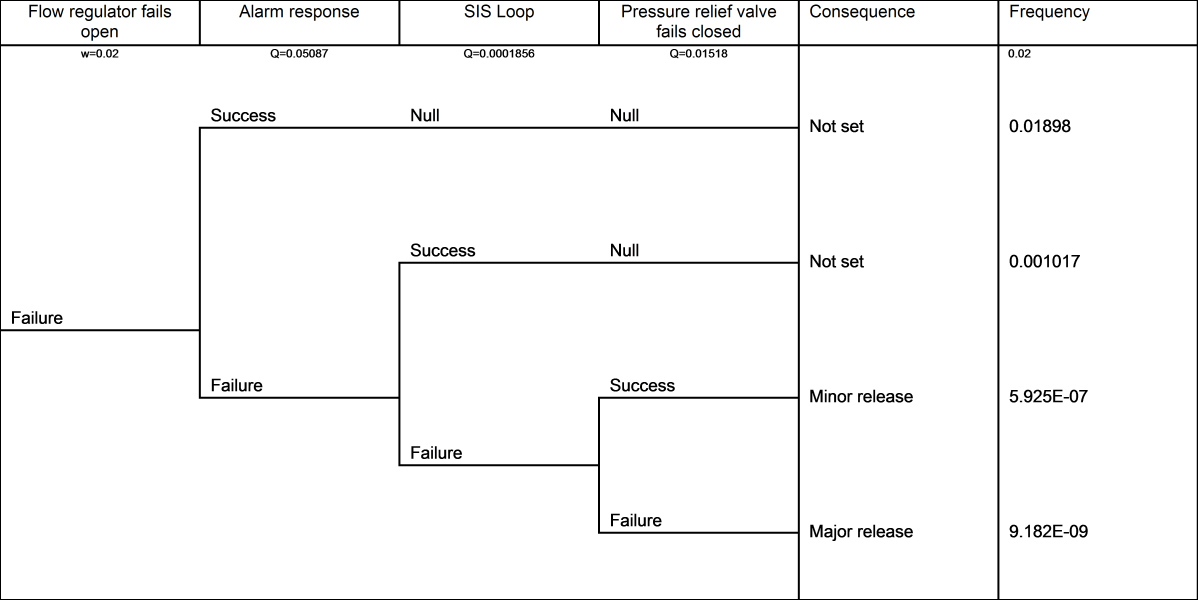
Event Tree Analysis (ETA) complementing your Fault Tree Analysis (FTA) is like putting salt on your popcorn. Event tree diagrams provide an excellent way of showing the possible outcomes of a hazardous event (often modelled in a FTA study). An ETA diagram is a simple, logical and easy to read diagram that breaks down data to show the possible consequences of failures in an FTA study.Event trees provide an inductive approach to reliability and risk assessment and are constructed using forward logic.
FaultTree+ in Reliability Workbench includes integrated event tree analysis. The event tree model may be linked to the fault tree model by using fault tree gate results as the source of event tree probabilities. FYI, if you already have a copy of FaultTree+ the Event Tree Software is included!
Please register for this educational Webinar: Linking FaultTree+ and Event Tree Analysis on Jun 2, 2016 11:00 AM MDT at: CLICK HERE
We appreciate your support of Isograph. If you have any general questions or comments please feel free to contact me.
Sincerely,
Jeremy Hynek
Isograph, Inc.
Director North American Operations
801 610 0045
jhynek@isograph.com
Upcoming training……
As many of you know we don't exactly get our of the office every week to offer public training courses. Please don't miss your opportunity to attended one of Isograph's training sessions to be held in Park City, Utah the week of June 27th, 2016. We will be offering training on Isograph's Reliability Workbench, FaultTree+ and Availability Workbench Software. In addition to the training in Park City will also be offering training in Houston this September, which will include our IEC 61508 training. For a complete list of dates please check our website: www.isograph.com .
The upcoming training in Park City offers an ideal location. Just 40 minutes from SLC international airport, Park City was home to the 2002 Winter Olympics and offers many lodging options and is well know for it outdoor/night-life activities. https://www.visitparkcity.com/ .
New this year we will begin to offer self paced web training. For more information please contact myself or Joe Belland: jbelland@isograph.com .
On a different note, for those Reliability Workbench users don't miss our "What's New" webinar this Wednesday at 12pm EST. In this Webinar we will go over the upgrades added to Reliability Workbench Version 13.
Please register here: Registration Click HERE
We appreciate your support of Isograph. If you have any general questions or comments please feel free to contact me.
Sincerely,
Jeremy Hynek
Isograph, Inc.
Director North American Operations
801 610 0045
jhynek@isograph.com
Data Linking Webinar
For those of you that were not able to attend our webinar addressing Data Links, or did not register in time, your still in luck. A recording of this meeting can be viewed online.
Webinar: Data Linking
Most of the Reliability, Safety, Maintenance and Availability community have the need to use the same data in different models. Prediction to FMEA, FMEA to Fault Tree, Prediction to Fault Tree, RBD to Prediction are just a few examples of where the same information can be used across different model types.
How are you moving data, spreadsheets, CSV import, XML import, Access import....fat-fingering the data from one application to another? In this webinar we will show you a better way. Using Data Links one can easily update data across all software applications where matching data is used/required. This not only makes life easier on your end it will increase the accuracy of your models and save you piles of time. For example one can update a prediction MTBF and the linked data will update the same data in FMEA, RBD and FTA models.
As many of you know sign up as soon as possible to ensure a seat in the webinar.
Friday February 12, 12:00 PM Easter Standard Time: