IEC 61508/61511, ISO26262, IEC61512, IEC62279…..ect…

Depending on your industry there are several adaptations of the IEC 61508 which include: the ISO 26262 for automotive, the IEC 61511 for SIS in process safety, the IEC 61513 for Nuclear power, IEC 62279 for Rail Software as well as many others. Basically if you are calculating System Integrity Levels (SIL) or Safety Instrumented Systems (SIS) we have you covered.

Please check out our webinar building a Fault Tree Model adhering to the IEC61508 (and all adaptations):

How to use Markov in a FaultTree+ or RBD model

Although a description of Markov can be a bit confusing, we will be using a simple schematic and model to show how and where a Markov model should be used in a FTA or RBD. Markov analysis provides a method for modeling systems that have complex inter-dependencies that are beyond the capabilities of standard analytical methods. For instance, strong dependencies between components such as cold or warm standby, limited repair crews, or fixed spare part replenishment intervals all present challenges to traditional methods, but can easily be modelled in Markov.

The Markov module provides a visual interface to construct the state transition diagram representing the system, then uses numerical integration to solve the problem. It also handles phasing and non-constant failure rates.

The models created in the Markov analysis module may be linked to basic events in the fault tree and event tree analysis modules. The following recorded webinar will introduce this idea:

Linking Fault Tree and Event Tree

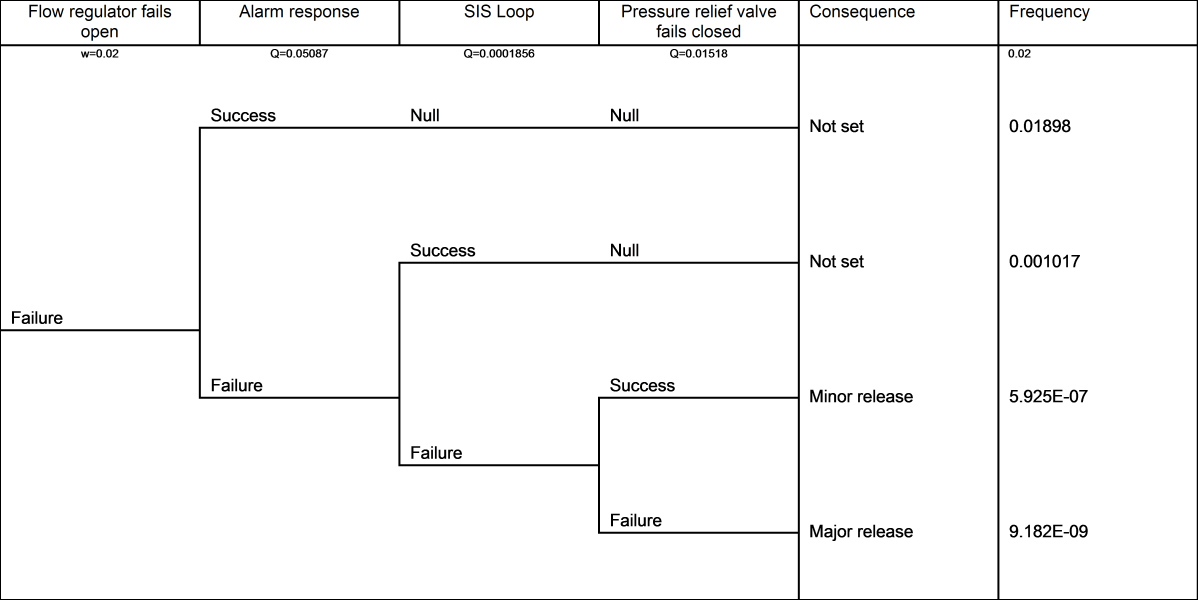
Event Tree Analysis (ETA) complementing your Fault Tree Analysis (FTA) is like putting salt on your popcorn. Event tree diagrams provide an excellent way of showing the possible outcomes of a hazardous event (often modelled in a FTA study). An ETA diagram is a simple, logical and easy to read diagram that breaks down data to show the possible consequences of failures in an FTA study.Event trees provide an inductive approach to reliability and risk assessment and are constructed using forward logic.

FaultTree+ in Reliability Workbench includes integrated event tree analysis. The event tree model may be linked to the fault tree model by using fault tree gate results as the source of event tree probabilities. FYI, if you already have a copy of FaultTree+ the Event Tree Software is included!

Please register for this educational Webinar: Linking FaultTree+ and Event Tree Analysis on Jun 2, 2016 11:00 AM MDT at: CLICK HERE

Flow Regulator ET

We appreciate your support of Isograph. If you have any general questions or comments please feel free to contact me.

Sincerely,

Jeremy Hynek
Isograph, Inc.
Director North American Operations
801 610 0045
jhynek@isograph.com

Upcoming training……

As many of you know we don't exactly get our of the office every week to offer public training courses. Please don't miss your opportunity to attended one of Isograph's training sessions to be held in Park City, Utah the week of June 27th, 2016. We will be offering training on Isograph's Reliability Workbench, FaultTree+ and Availability Workbench Software. In addition to the training in Park City will also be offering training in Houston this September, which will include our IEC 61508 training. For a complete list of dates please check our website: www.isograph.com .

The upcoming training in Park City offers an ideal location. Just 40 minutes from SLC international airport, Park City was home to the 2002 Winter Olympics and offers many lodging options and is well know for it outdoor/night-life activities. https://www.visitparkcity.com/ .

New this year we will begin to offer self paced web training. For more information please contact myself or Joe Belland: jbelland@isograph.com .
On a different note, for those Reliability Workbench users don't miss our "What's New" webinar this Wednesday at 12pm EST. In this Webinar we will go over the upgrades added to Reliability Workbench Version 13.

Please register here: Registration Click HERE
We appreciate your support of Isograph. If you have any general questions or comments please feel free to contact me.

Sincerely,

Jeremy Hynek
Isograph, Inc.
Director North American Operations
801 610 0045
jhynek@isograph.com

Data Linking Webinar

For those of you that were not able to attend our webinar addressing Data Links, or did not register in time, your still in luck. A recording of this meeting can be viewed online.

Webinar: Data Linking

Most of the Reliability, Safety, Maintenance and Availability community have the need to use the same data in different models. Prediction to FMEA, FMEA to Fault Tree, Prediction to Fault Tree, RBD to Prediction are just a few examples of where the same information can be used across different model types.
How are you moving data, spreadsheets, CSV import, XML import, Access import....fat-fingering the data from one application to another? In this webinar we will show you a better way. Using Data Links one can easily update data across all software applications where matching data is used/required. This not only makes life easier on your end it will increase the accuracy of your models and save you piles of time. For example one can update a prediction MTBF and the linked data will update the same data in FMEA, RBD and FTA models.
As many of you know sign up as soon as possible to ensure a seat in the webinar.
Friday February 12, 12:00 PM Easter Standard Time:

Windows 10 compliance

We’re sure by now that many of you have seen the Microsoft Windows® 10 upgrade notification appear in the task bar prompting you to upgrade. If you wish to do so then we have a few steps that need to be taken to ensure the smooth transition of your license, this applies to a standalone license as well as a floating license.
Standalone:
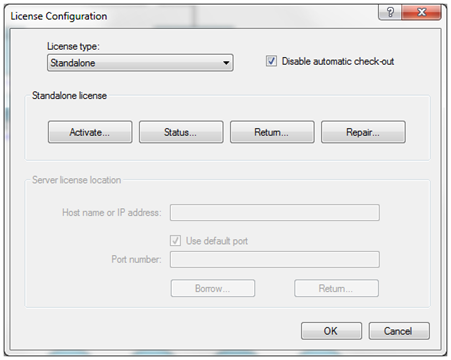
If you don’t connect to a server to obtain your license then you have a standalone license, to return this license open your software and go to Tools->License Configuration click on the “Return” button
0

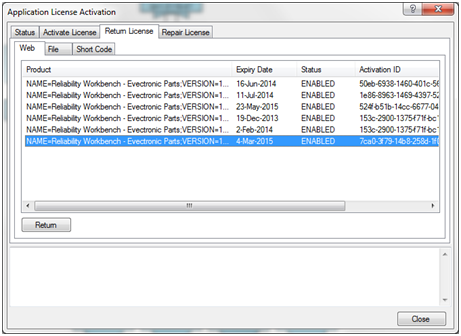
Select the license you wish to return, make a note of the activation ID as we will need this later and press the return button.
1

NB: This method will return the license via a web connection, if your IT policy restricts outbound connections then please use the file method to return the license.
Once you have upgraded Windows® 10, re-open your program and repeat the steps above, this time clicking Activate instead of return. Enter your activation ID and the number of copies you were issued and click the Activate Button.

2

NB: This method will activate the license via a web connection, if your IT policy restricts outbound connections then please use the file method to activate the license.

Floating Licenses
If you connect to a server to obtain your licence then you have a floating licence – please note this guide only applies if you are upgrading your server to Windows® 10, not your client.
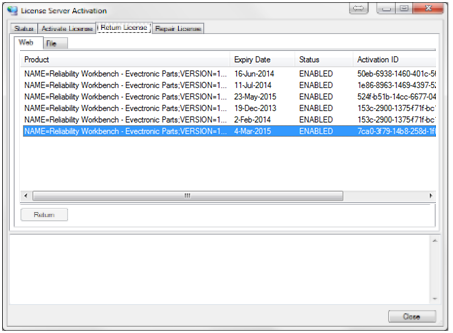
On the server machine using either LMTOOLS or LMADMIN stop the Isograph service. Once stopped open the License Server Activation program, click on the return tab and select the license you wish to return
3

Make a note of the activation ID as we will need this later. Click the return button.
NB: This method will return the license via a web connection, if your IT policy restricts outbound connections then please use the file method to return the license.
Once your upgrade to Windows® 10 has been completed re-open the License Server Activation program and go to the “Activate Licenses” tab.

4

Enter the Activation ID noted earlier and the number of copies you were issued with. Click the Activate button to re-activate your license.
NB: This method will activate the license via a web connection, if your IT policy restricts outbound connections then please use the file method to activate the license.
You should now be able to use your license server with Windows® 10.
If you do have any issues feel free to get in touch with our support team via:
support@isograph.com or +44 (0) 1925437002 (Europe and Rest of the World), 801 610 0042 (USA)

Microsoft and Windows are either registered trademarks or trademarks of Microsoft Corporation in the United States and/or other countries.
Reliability 2.0 Presentation

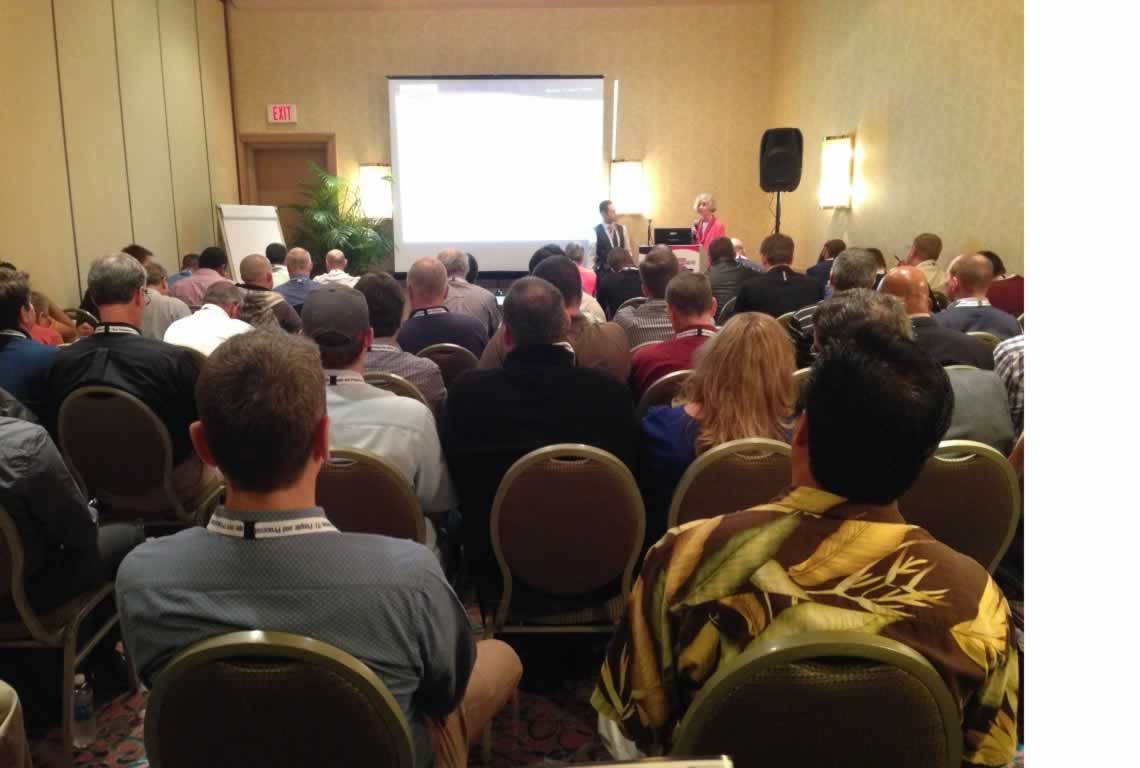
Next week we will be attending the Reliability 2.0 Conference in Las Vegas. Something interesting about Isograph is our hand-picked staff.  We have 4 PHDs to support Isograph's Software, Training and Programming efforts. This includes Dr. David Wiseman who will be presenting his paper titled: "Availability Analysis and Design Selection using Monte Carlo Simulation".  Below is a photo from his last presentation at IMC, what you cannot see in this photo is the people standing in the hall! So if you plan on attending this paper arrive early and bring your camping chair to ensure you get a seat.

For more information on this conference please visit the ReliabilityWeb conference website:

http://reliabilityconference.com/

David-photo

Reporting on a Fault Tree Model

As many of you requested I have posted the recording titled "Reporting on a Fault Tree Model" . In this webinar we showed a few of the many features available in the report designer.

https://attendee.gotowebinar.com/recording/6873753437059734017

One of the most important aspects of your reliability or safety studies is the creation of professional standard reports that will enable you to present the results in a clear and understandable form to colleagues, management, customers and regulatory bodies.

HOW CAN I USE THE REPORT DESIGNER?

The Isograph reliability software products share a common facility to produce reports containing text, graphs or diagrams. Your input data and output results from reliability applications are stored in a database. This information can be examined, filtered, sorted and displayed by the Report Designer. The Report Designer allows you to use reports supplied by Isograph to print or print preview the data. A set of report format appropriate to the product is supplied with each product.

You can also design your own reports, either from an empty report page or by copying one of the supplied reports and using that as the starting point.

Reports may published or exported to PDF and Word formats.

As always please feel free to contact me if you have any questions: jhynek@isograph.com .

Let's Keep In Touch!

Subscribe to our newsletter to get the latest information on Isograph software.


By submitting this form, you are consenting to receive marketing emails from: . You can revoke your consent to receive emails at any time by using the SafeUnsubscribe® link, found at the bottom of every email. Emails are serviced by Constant Contact